Deployment
Run AppThentic in your own infrastructure or on AppThentic cloud. In your infrastructure, om, its model, runs there too or on AppThentic's servers.
AppThentic runs in one of two places. You choose.
Where it runs
In your infrastructure. AppThentic is installed in your cloud account or your data centre and licensed to your company. These run there:
- The readers that connect to your sources: code, tickets, docs, threads and the rest. See Reading your systems.
- Organization Memory, which holds every rule, answer and approval.
- The interface people use to ask questions and approve answers.
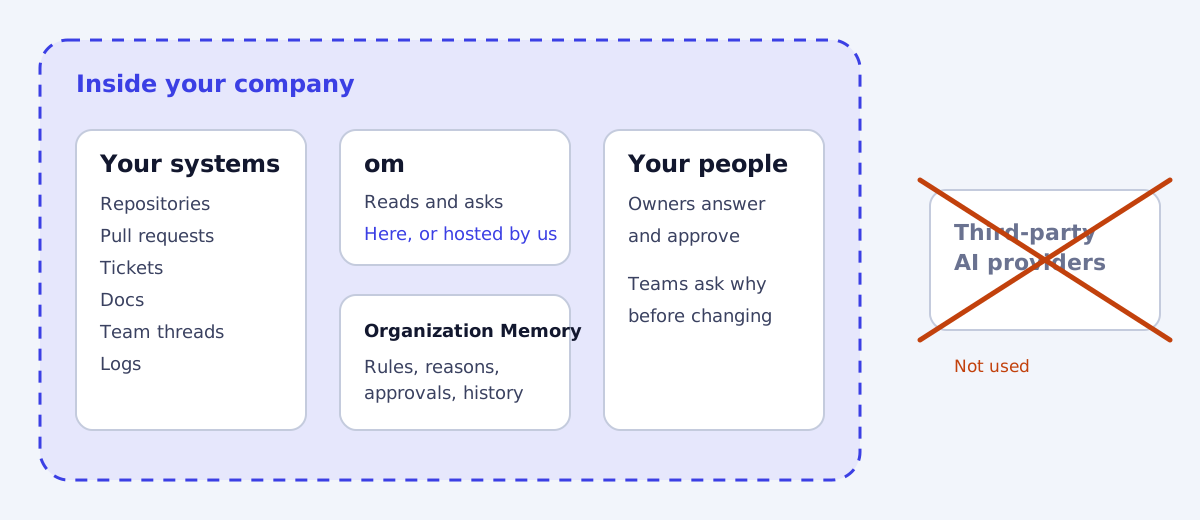
On AppThentic cloud. We run AppThentic for you. There is nothing to install: your admin signs in, connects your sources and adds members. Organization Memory is stored on AppThentic’s servers, and om runs there too.
See Data handling for where each kind of data is stored in each option.
In your infrastructure: where om runs
| What differs | om in your infrastructure | om hosted by AppThentic |
|---|---|---|
| Where inference runs | Your cloud or data centre, on a self-hosted model | An enterprise model provider, under zero data retention |
| What leaves your network | Nothing | The requests om works on, sent to AppThentic and the model provider |
| Model updates | Delivered to you and installed in your environment | Applied by AppThentic |
| Hardware | Yours to provide | None |
| Works with no outbound internet | Yes | No |
When AppThentic runs in your infrastructure, your repositories, Organization Memory and application data stay there whichever you choose. When om is hosted by AppThentic, it uses enterprise AI models under zero data retention, and no provider trains on your data. See om.
Licensing and security
When AppThentic runs in your infrastructure, it is licensed per company and activated with a license key. The key turns on updates and support. It never opens a connection into your environment. See Plans and buying for what the license covers and costs.
Your data is protected by where AppThentic runs, sign-in through your company’s own sign-in system, a check of what each person may see before anything is retrieved, encryption of your data, credentials and secrets, and a complete audit trail. See Access and audit trail.
Rollout
Most teams start with one business area and expand. See Quickstart.